
Cookie duration determines how long an affiliate referral link remains active after a visitor clicks it. This setting is crucial for accurately attributing sales to the correct affiliate, even if the purchase happens days or weeks after the initial click.
- Cookie duration determines how long an affiliate gets credit after a click
- Longer durations help with longer sales cycles
- Shorter durations reduce attribution window
Cookie Duration on revshare
- Flexible cookie duration
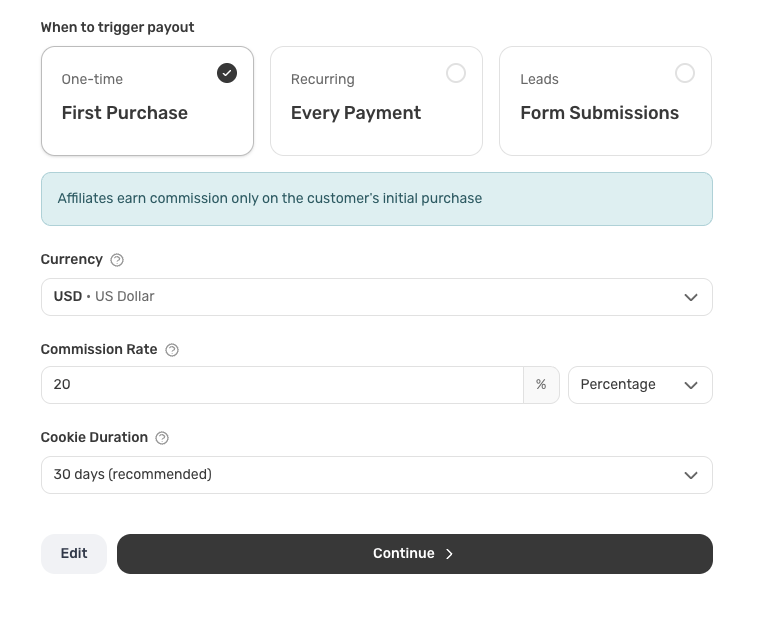
- Choose from 5, 15, 30 (recommended), 60, 90, 180, or 365 days
- Set per program to match your sales cycle
- Longer durations give affiliates more time to convert
Use cases
- 5–15 days: Fast-moving products, impulse purchases
- 30 days: Standard e-commerce (recommended)
- 60–90 days: Higher consideration purchases
- 180–365 days: Enterprise/B2B with long cycles
Benefits
- Customize per program
- One-time setup during program creation
- Clear tooltips and guidance in the dashboard
What is Cookie Duration?
When a visitor clicks an affiliate link, Revshare stores a cookie in their browser containing the affiliate's referral code. The cookie duration setting determines how long this cookie remains valid—ranging from 5 days to 365 days (or lifetime).
During this period, any purchase made by that visitor will be automatically attributed to the affiliate who referred them, ensuring they receive credit for the sale even if the customer takes time to decide.
How It Works
Here's the step-by-step process:
- Visitor clicks affiliate link — When someone clicks an affiliate's referral link, our tracking script detects the referral code in the URL (e.g.,
?ref=ABC123). - Cookie is set — The referral code is stored in a browser cookie with the duration you've configured (default: 30 days).
- Cookie persists across sessions — Even if the visitor closes their browser and returns later, the cookie remains active until it expires.
- Purchase is attributed — When the visitor makes a purchase, our system reads the cookie and automatically credits the sale to the referring affiliate.
Technical note: The cookie is set with the name revshare_ref_[programId] and includes the affiliate's referral code. It uses SameSite=Lax for security and can be configured for cross-subdomain tracking.
Last-Click Attribution
Revshare uses last-click attribution. This means the cookie only resets when a visitor clicks a new affiliate link.
- New referral click: If a visitor clicks
?ref=affiliate2, the old cookie is overwritten. The new affiliate gets credit and the expiration resets. - No new click: If a visitor returns without a
?ref=parameter, the existing cookie is preserved. The original affiliate keeps credit.
Example:
Day 1: User clicks ?ref=affiliate1 → cookie set for affiliate1
Day 5: User clicks ?ref=affiliate2 → cookie overwritten, affiliate2 gets credit
Day 10: User purchases → affiliate2 earns commission
Last-click rewards the affiliate who actually convinced the customer to buy—the one who did the final work to close the sale. Learn more about why last-click is best →
Browser Limits (180 Days)
Even if you set a cookie duration of 365 days, most browsers cap cookies at ~180 days.
This is due to privacy features like Safari's Intelligent Tracking Prevention (ITP) and similar policies in Chrome, Firefox, and Edge. They automatically delete older cookies to protect user privacy.
What this means: If a visitor clicks an affiliate link but doesn't return for 6+ months, the browser may have deleted the cookie. The affiliate won't get credit for that sale.
For most businesses this isn't an issue—customers rarely take 6 months to purchase. But if you have very long B2B sales cycles, be aware that browser privacy features may limit effective cookie duration.
Choosing the Right Duration
The ideal cookie duration depends on your business model and typical customer journey:
- 5-15 days — Best for impulse purchases or products with short decision cycles. Ideal for e-commerce, digital downloads, or low-ticket items.
- 30 days (Recommended) — The default setting works well for most businesses. Balances attribution accuracy with customer privacy. Suitable for SaaS subscriptions, online courses, and mid-ticket products.
- 60-90 days — Better for high-ticket items or services with longer sales cycles. Useful for B2B products, enterprise software, or expensive courses where customers need more time to evaluate.
- 180-365 days — For very high-value products or services with extended decision-making periods. Consider this for enterprise deals, custom solutions, or products requiring significant research.
Cross-Domain Tracking
Revshare supports cross-domain tracking, which means the cookie works even when your landing page and checkout are on different domains (e.g., example.com → checkout.example.com).
When configuring your tracking script, you can specify a domain attribute (e.g., data-domain=".example.com") to enable cookie sharing across subdomains. This ensures seamless tracking even when customers navigate between different parts of your site.
Need help configuring cookie duration? You can adjust this setting anytime in your program setup under "Commission Structure" → "Cookie Duration".
Cookie Duration on Revshare
Here's what Revshare offers for cookie-based affiliate tracking:
- Flexible cookie durations from 5 days to 365 days (or lifetime)
- Cross-domain tracking between
example.comandcheckout.example.com - Secure cookies with
SameSite=Laxattribute - Automatic attribution when customers return to purchase
- Per-program cookie settings for multi-program setups
- Real-time tracking without delays or manual attribution